Cincopa Frontend White-Label Components
This guide explains the frontend capabilities of Cincopa that support everything from recording and uploading media to managing galleries and embedding editing tools directly inside your application. Whether you're integrating Cincopa into a CMS, LMS, CRM, or a custom web platform, this guide explains what each capability does and how it fits into your video workflow.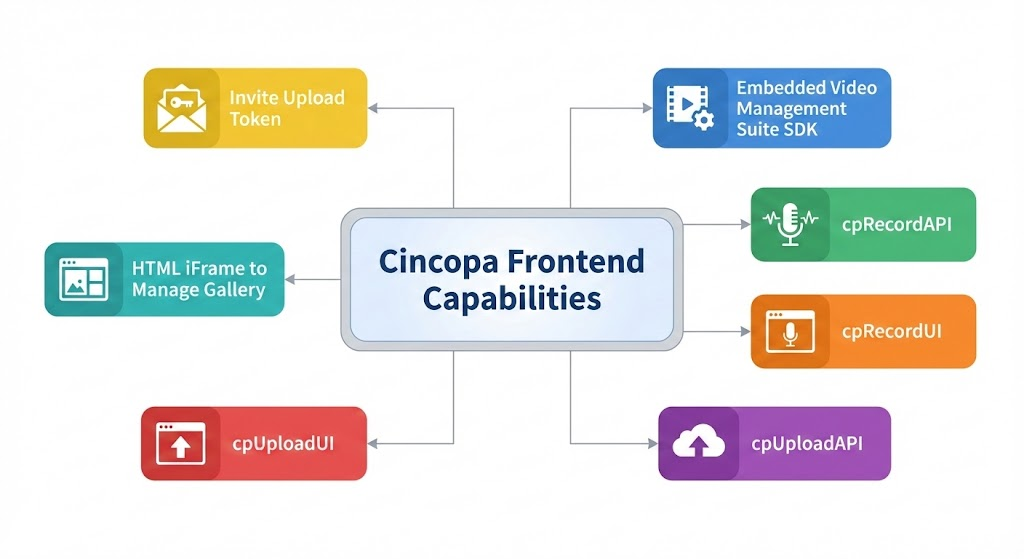
1. Embedded Video Management Suite SDK: Embed a complete video-management interface directly inside your product.
2. cpRecordAPI: Provides full programmatic control for building custom recording flows.
3. cpRecordUI: Offers a ready-made recording widget you can drop into any page.
4. cpUploadAPI: Enables building custom upload experiences with detailed control.
5. cpUploadUI: Provides a simple drag-and-drop uploader that works out of the box.
6. HTML iFrame to Manage Gallery: Allows users to organize and edit media collections inside your environment.
7. Invite Upload Token: Supports secure, time-limited uploads from external contributors.
1. Embedded Video Management Suite SDK
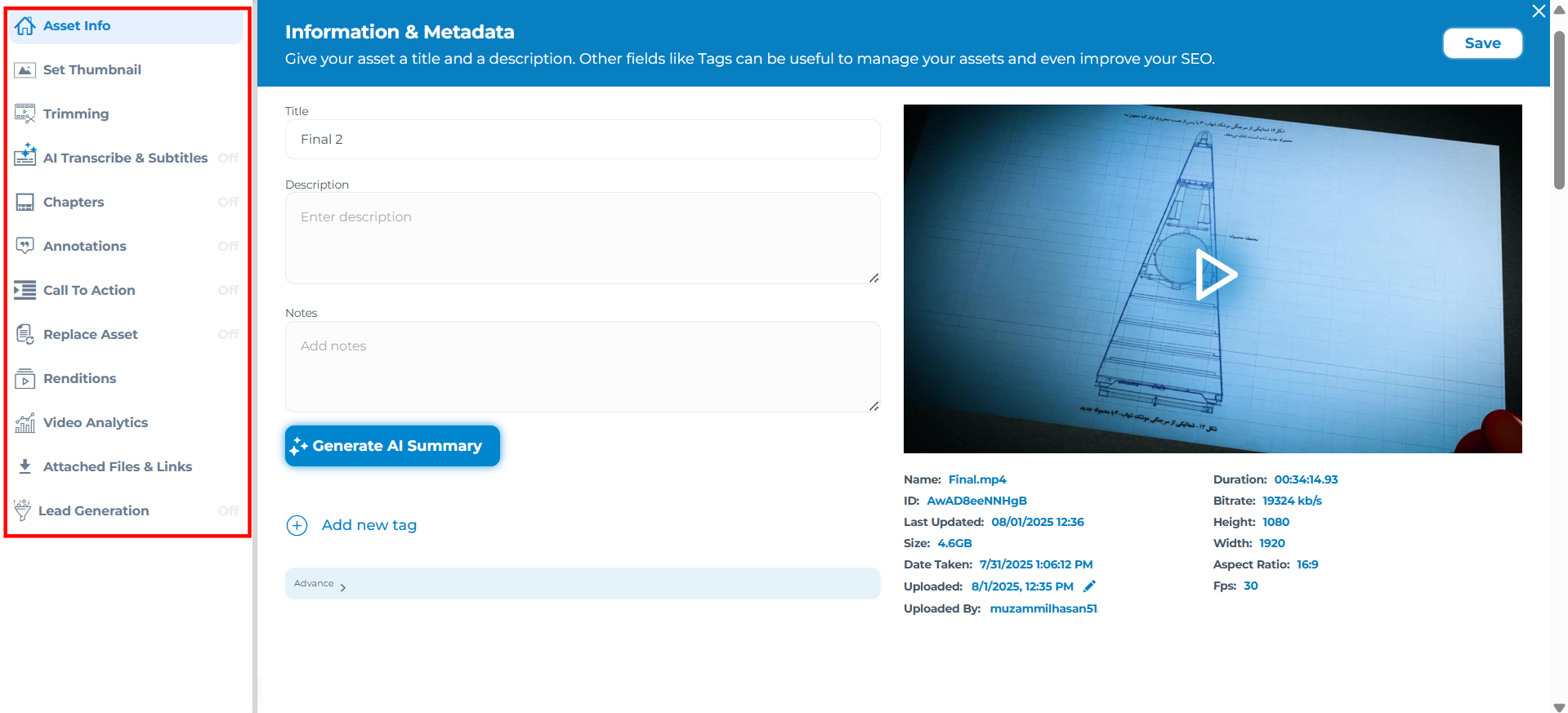
The Embedded Video Management Suite SDK allows you to bring Cincopa’s full video management experience directly inside your platform. Instead of redirecting users to an external studio, this SDK lets you embed a complete management suite where users can update video titles, add chapters, choose thumbnails, edit metadata, manage call-to-action elements, insert annotations, trim videos, enable AI transcription and subtitles, configure audio tracks, review renditions, replace assets, access video analytics, and extend functionality using custom modules. It’s built to fit headless CMS environments and admin environments that require inline video management.
Key Features
Load editor on demand (cincopa.loadEditor)
Supports built-in modules (chapters, CTA, captions, analytics…)
Allow customers to build their own modules via JS/CSS that will be added to the management suite.
Authentication via token
Ideal for headless CMS integrations
Use Case
Imagine you’re building a content editor inside a headless CMS like Sanity, Strapi, Shopify, or a custom internal admin panel. Your content creators shouldn’t have to leave the editing environment, open a separate dashboard, or switch tabs just to update a video thumbnail or add chapters to a product demo.
By integrating this SDK, they can instantly open the inline Cincopa management suite inside your UI. Everything, from metadata to captions to CTAs, happens right inside the page they’re already working on, keeping workflows smooth and intuitive. This creates a unified content-editing experience where your users feel like the video management suite is a native part of your product.
2. cpRecordAPI
cpRecordAPI is a low-level, fully programmable recording engine that gives developers complete control over webcam and microphone recording in the browser. It lets you control every aspect of the recording flow, including resolution, bitrate, frame rate, audio options, input device selection, permissions, recording state management, and upload logic. With detailed callbacks for every event, it becomes possible to build fully customized recording experiences.
Key Features
Start/stop/pause recording programmatically
Select audio/video devices
Get device permissions
Auto-upload or manual upload
Detailed callbacks (onRecord, onStop, onUploadProgress…)
Use Case
When your application requires a custom recording flow that must integrate closely with your product’s UI, cpRecordAPI provides the control needed to build that experience. For example, platforms that conduct interviews, capture user testimonials, or record lesson submissions often need their own UI elements, countdowns, validation steps, or review screens. With cpRecordAPI, you can design these flows exactly as needed while relying on the API to manage the technical aspects of recording and uploading video.
3. cpRecordUI
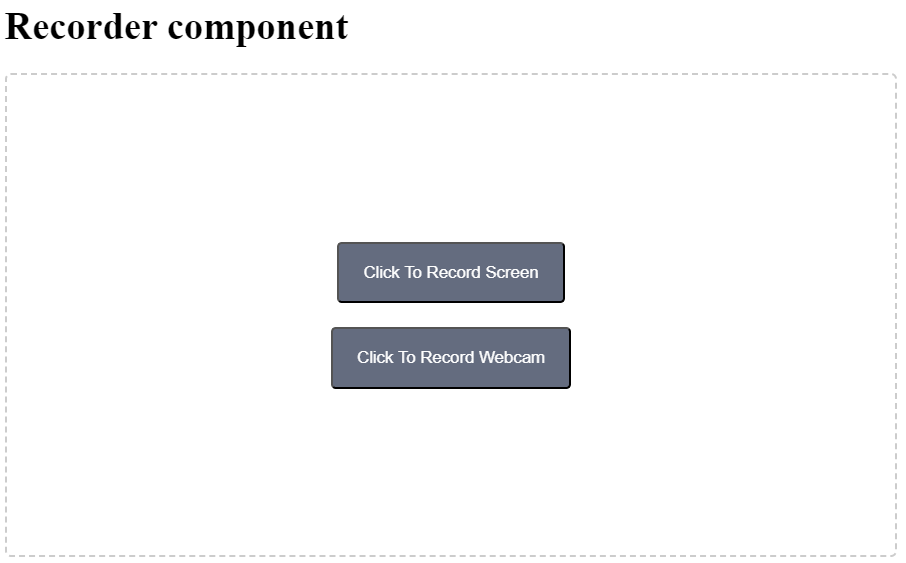 cpRecordUI offers a complete recording interface that you can embed inside any webpage. Unlike cpRecordAPI, which requires you to design your UI, cpRecordUI gives you a fully functioning widget with preview, start/stop buttons, and optional auto-upload. This allows you to add a recording feature in minutes without building interface elements from scratch.
Key Features
Includes recording UI
Auto record and upload support
Lightweight setup
Theme and size customization
Super fast uploading to the Cincopa server using a dedicated upload CDN.
Use Case
This capability is ideal when you need to give users a straightforward way to record videos without investing engineering time into UI development. For example, imagine you run an online learning platform where instructors record short video lessons or student updates.
Embedding a ready-made recording widget means instructors can click “Record,” preview themselves, talk, stop the recording, and instantly upload it—no technical steps required. The entire UI already comes styled and functional, making it especially helpful for fast integrations, minimalistic workflows, or platforms where users just need a reliable way to capture media without complexity.
4. cpUploadAPI
cpUploadAPI provides programmatic control for uploading video and other files from the browser. Unlike cpRecord, it’s designed for cases where recording is not needed and only uploading is needed. With support for progress tracking, pausing, resuming, restarting, and reacting to upload events, cpUploadAPI gives developers everything they need to manage uploads precisely.
Key Features
Upload any File object
Full upload state tracking
Pause/resume support
Set your account upload_url per environment
Detailed progress callbacks
Super fast uploading to the Cincopa server using a dedicated upload CDN.
Use Case
Use this capability when your product requires a custom upload workflow, where simply dropping in a ready-made upload widget isn’t flexible enough. For example, if you're building a CRM where sales reps attach video walkthroughs, or a video editing platform where users upload multiple drafts before choosing one, this API lets you design a multi-step, branded upload experience. You can validate file size, show your own progress bar, handle network interruptions gracefully with pause/resume, and log upload events to your own system. It’s perfect for applications that need uploads to be tightly integrated with the product’s state, UI, or business rules.
5. cpUploadUI
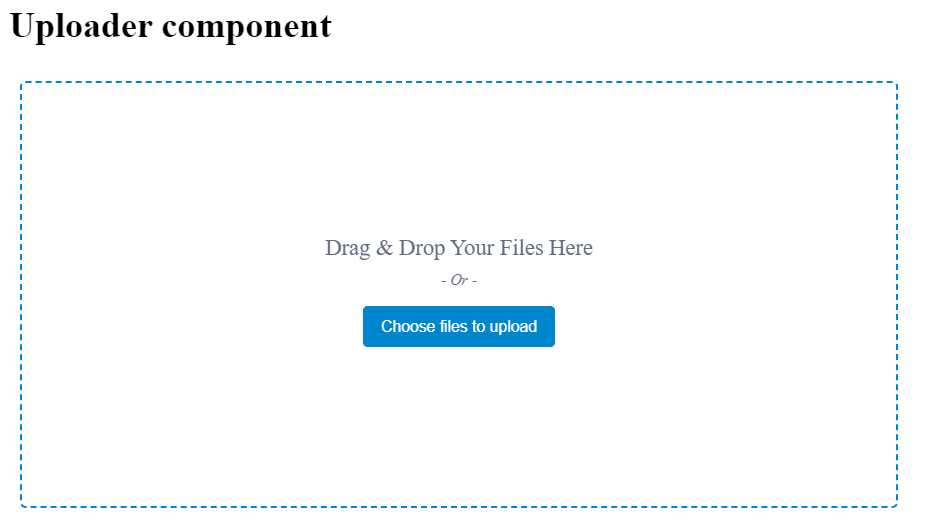
cpUploadUI is a drop-in upload component that gives users a clean, friendly drag-and-drop interface. It doesn’t require developers to build any UI for uploading. The widget supports multiple file uploads, file type restrictions, visual progress, and automatic uploading, making it a quick solution for any platform that needs a simple user-facing uploader.
Key Features
Drag & drop interface
Multiple file uploads
Theme customization
Regex validation for allowed file types
Built-in progress and status UI
Super fast uploading to the Cincopa server using a dedicated upload CDN.
Use Case
This widget is to allow content team in a CMS or blogging platform, to quickly drop multiple images or videos into a post. Or in a product catalog system, a merchant might want to upload product demo videos.
Instead of building a custom upload feature with progress indicators and drag-and-drop support, you can embed cpUploadUI and instantly give users a familiar, intuitive upload experience. The component feels like part of the platform but requires no custom UI coding—saving significant development time.
6. HTML iFrame to Manage Gallery
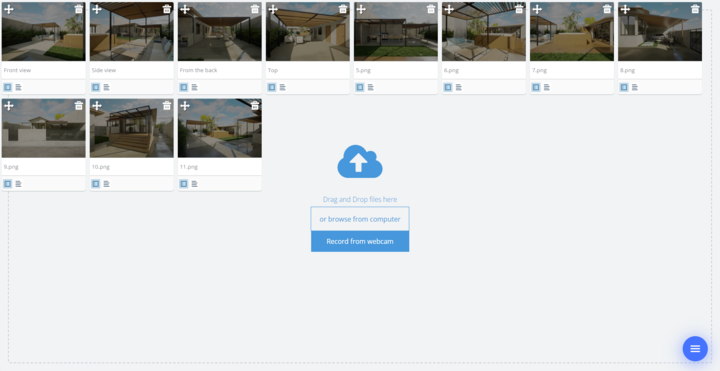
The gallery management iframe is a fully self-contained tool that lets users upload, reorder, edit, and delete media inside a gallery—all through a single embedded iframe. It automatically adapts to the parent page layout and requires no backend or UI development from your side. You can link galleries using Cincopa’s FID or your system’s own identifier (RRID), making it useful for deep integrations.
Key Features
Automatic responsive UI
Upload, reorder, delete assets
Metadata editing
Supports external identifiers (RRID) for CRM/LMS integrations
Super fast uploading to the Cincopa server using a dedicated upload CDN.
Use Case
This is effective in platforms where users need to manage collections of media directly inside an editor or object. For example, if you're building an LMS, teachers may want to add lesson media without navigating to a separate media library.
Embedding this iframe inside your lesson editor allows them to upload videos, reorder items, and update metadata right where they are. Similarly, in a CRM like Salesforce, you can attach a gallery iframe to a product object so sales teams can manage product images and videos in place. The iframe provides a complete gallery management experience without requiring your team to build toggle menus, sorting UI, upload zones, or metadata forms.
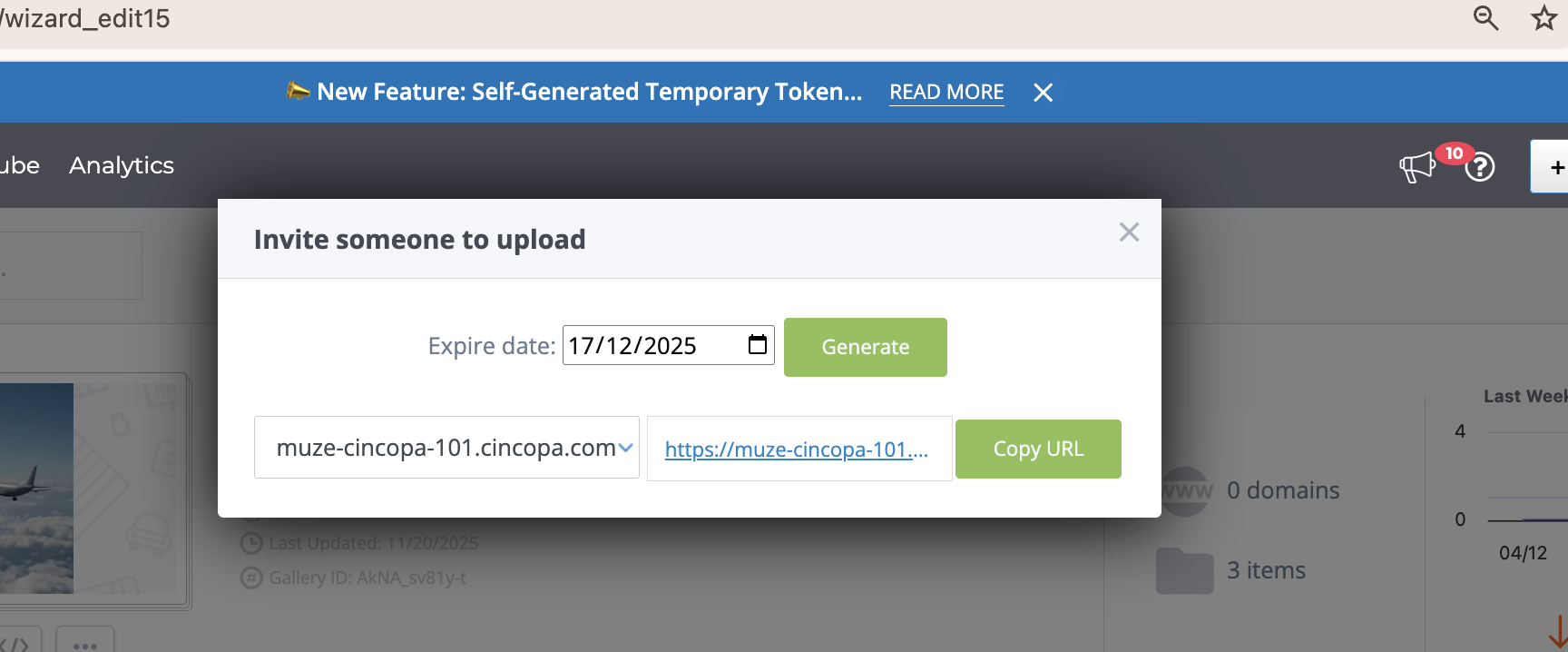
7. Invite Upload Token
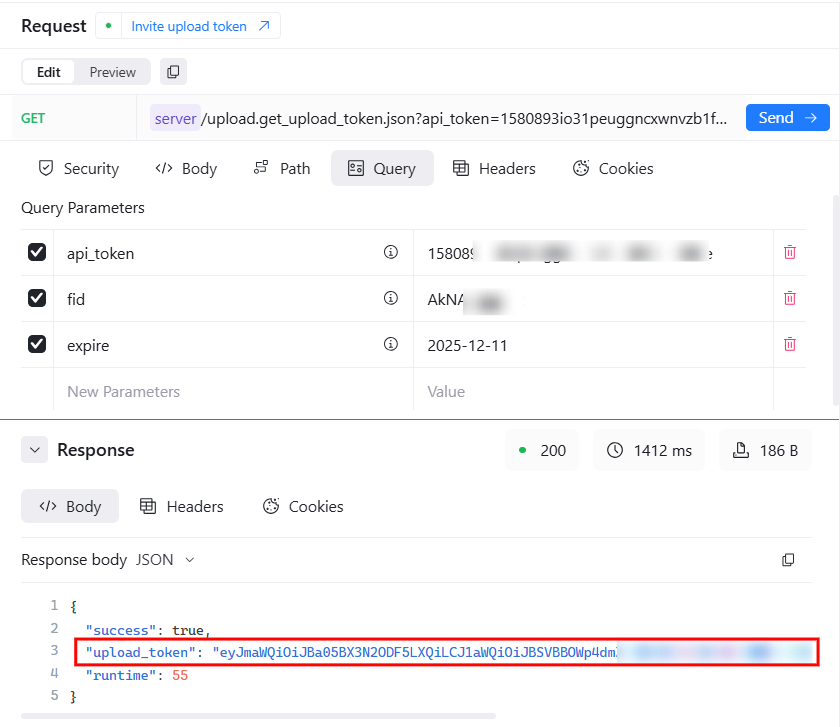
The Invite Upload Token API generates secure, temporary upload tokens that give external users permission to upload media to a specific gallery within a set timeframe. This allows controlled access without providing full API credentials or permanent permissions.
Key Features
Generate invite-only upload tokens
Control token expiration
Secure, API-key-protected access
Super fast uploading to the Cincopa server using a dedicated upload CDN.
Use Case
This capability becomes essential when your platform occasionally needs content from users who are not part of your system. For example, if you're running a community campaign where participants must submit videos, or hosting a virtual event where speakers need to upload session recordings, you don’t want to create accounts for each contributor.
Instead, you generate time-limited upload links that allow these contributors to upload their videos securely. The link expires automatically, ensuring that uploads remain controlled and temporary. Your internal galleries stay protected while guests can contribute media effortlessly.
Methods to Generate an Invite Upload Token
To generate an invite upload token, we have two methods available: one through the Cincopa API and the other using the Cincopa UI.
Method 1: Using the API
You can generate the upload token programmatically via the Cincopa API. This method offers full control over token generation and expiration.
For detailed steps on generating tokens via the API, refer to the “Invite upload token” API Documentation.
Method 2: Using Cincopa UI
Alternatively, you can use Cincopa’s built-in UI to generate an invite upload token through the interface. This method provides a simple, no-code solution for generating and managing tokens.
For more information, refer to the Invite to Upload Documentation.